
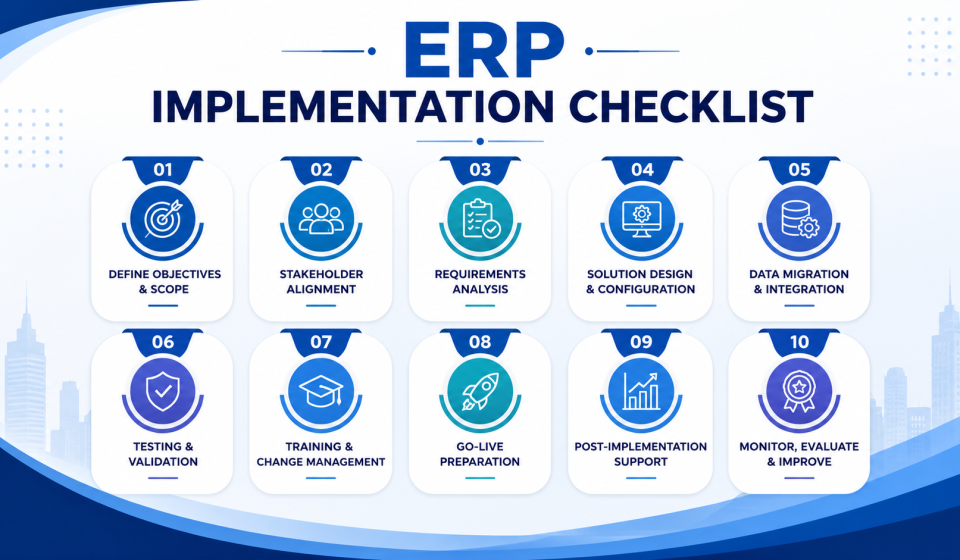
ERP Implementation Checklist: The Complete Step-by-Step Guide for Successful ERP Deployment

Introduction
Enterprise Resource Planning (ERP) implementation has become one of the most critical business transformation initiatives for organizations aiming to improve operational efficiency, enhance visibility, and achieve sustainable growth. However, despite significant investments, many ERP projects still fail to deliver expected outcomes due to poor planning, inadequate user adoption, unclear objectives, and lack of execution discipline.
According to recent industry research, organizations that follow a structured ERP implementation methodology experience significantly higher project success rates compared to those that approach ERP deployment without a comprehensive roadmap. Furthermore, businesses that integrate Artificial Intelligence (AI), automation, and data-driven decision-making into their ERP strategy are achieving faster ROI, improved productivity, and stronger competitive advantages.
Nevertheless, ERP implementation is not simply a technology upgrade. Instead, it represents a complete business transformation that affects processes, people, data, and decision-making across the organization.
Consequently, organizations require a detailed ERP implementation checklist to minimize risks, avoid costly mistakes, and maximize the value of their ERP investment.
This comprehensive guide explains every stage of ERP implementation, highlights common business challenges, and provides practical solutions to ensure a successful ERP deployment.
✓ Do you have documented core business processes?
✓ Is your current data clean and centralized (not scattered across spreadsheets)?
✓ Do you have executive sponsorship and budget approved?
✓ Have you identified your must-have vs nice-to-have features?
✓ Is your team prepared for a change-management process?
✓ Do you have a realistic implementation timeline (3–9 months)?
✓ Have you evaluated at least 3 vendors?
✓ Do you have IT infrastructure/internet reliability for cloud ERP?
✓ Have you budgeted for training and post-go-live support?
✓ Do you have a plan for data migration from legacy systems?
Why Most ERP Implementations Fail
Many organizations assume that purchasing ERP software automatically solves operational inefficiencies. However, implementation failures often occur because companies focus primarily on technology while ignoring business processes and employee readiness.
Lack of Clear Business Objectives
One of the most common reasons ERP projects fail is the absence of clearly defined business goals.
Many companies initiate ERP implementation because competitors have adopted similar systems or because management believes modernization is necessary. However, without measurable objectives, project teams struggle to define success.
For example, a manufacturing company may implement ERP to reduce inventory costs. Yet if inventory reduction targets are not established before deployment, measuring ROI becomes difficult.
Therefore, organizations should define specific goals such as:
- Reducing inventory carrying costs by 25%
- Improving order fulfillment accuracy by 30%
- Reducing manual reporting time by 70%
- Increasing production efficiency by 20%
As a result, every implementation activity can align with business outcomes.
Poor User Adoption
Even the most advanced ERP system will fail if employees resist using it. Employees often fear change because they worry about job security, increased workloads, or unfamiliar workflows. Consequently, organizations experience low adoption rates, process inconsistencies, and reduced productivity after deployment. To overcome this challenge, companies must invest in change management, employee engagement, and role-based training programs throughout the implementation lifecycle.
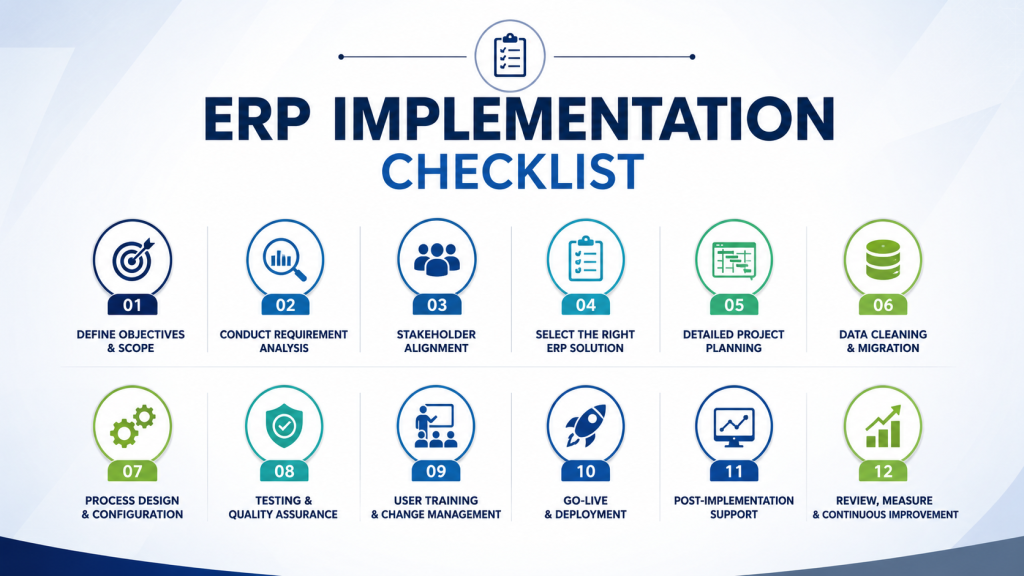
ERP Implementation Checklist: Step-by-Step Framework
Define Business Goals and Success Metrics
Before selecting software or engaging implementation partners, organizations must establish a clear vision for the ERP project. This phase serves as the foundation of the entire implementation process.
Business leaders should identify:
- Current operational challenges
- Desired business outcomes
- Key performance indicators (KPIs)
- Expected ROI targets
- Process improvement opportunities
For instance, if delayed customer deliveries are affecting revenue, ERP objectives should focus on supply chain visibility and order management optimization. Moreover, executive stakeholders must agree on priorities to prevent scope changes later in the project.
Establish an ERP Implementation Team
ERP implementation requires strong collaboration across multiple departments. However, many organizations make the mistake of relying only on their IT teams, which often creates a gap between technical deployment and actual business requirements. As a result, the ERP system may not fully support day-to-day operations or meet user expectations.
To ensure success, organizations should build a cross-functional implementation team that includes representatives from key departments such as finance, operations, procurement, sales, inventory, human resources, and IT. Department heads and end-users should actively participate in requirement gathering, process mapping, testing, and training activities. Additionally, executive sponsors should provide strategic direction, resolve conflicts, and ensure organizational alignment throughout the project. By involving all stakeholders from the beginning, businesses can improve user adoption, reduce implementation risks, and ensure the ERP system effectively supports operational and strategic goals.
A successful implementation team should include:
Executive Sponsor
The executive sponsor provides strategic leadership throughout the ERP implementation process. They approve project budgets, allocate necessary resources, and ensure alignment with business objectives. Additionally, they help remove organizational barriers, resolve critical issues, and drive stakeholder commitment for successful project execution.
Project Manager
The project manager oversees the entire ERP implementation process and ensures the project stays on track. They coordinate timelines, manage resources, monitor risks, and facilitate communication between teams. Additionally, they ensure tasks are completed on schedule and project objectives are successfully achieved.
Department Representatives
Representatives from finance, HR, manufacturing, procurement, inventory, sales, and operations play a critical role in ERP implementation success. They help identify department-specific processes, challenges, and requirements to ensure all business needs are accurately captured. As a result, the ERP system is configured to support real-world operations, improve user adoption, and deliver maximum business value.
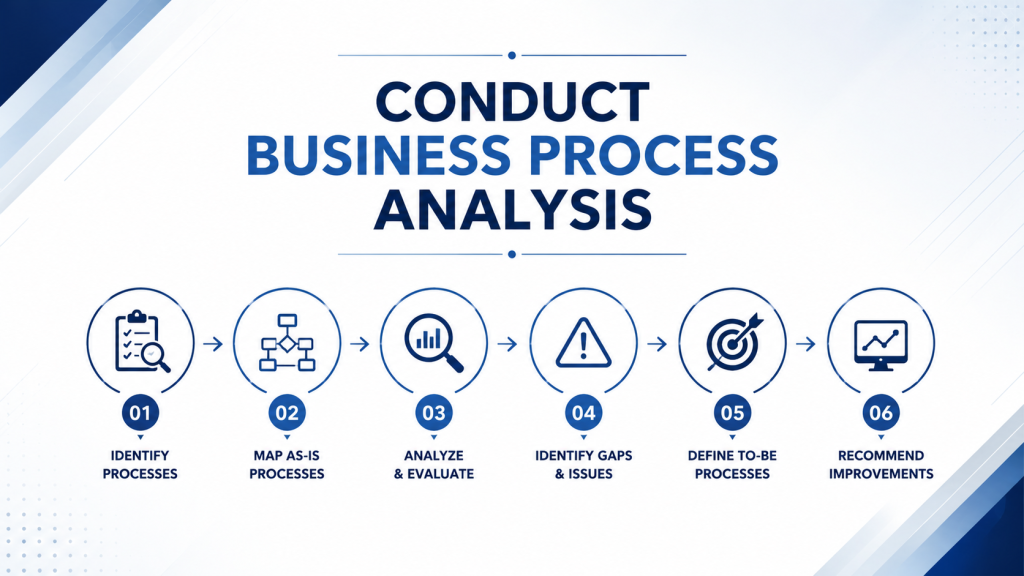
Conduct Business Process Analysis
Before configuring ERP software, organizations must understand existing processes. Many businesses unknowingly automate inefficient workflows, resulting in digitalized inefficiencies instead of optimized operations. Therefore, process mapping becomes essential. Organizations should evaluate:
Current Workflow Bottlenecks
Common bottlenecks include:
- Manual approvals
- Duplicate data entry
- Spreadsheet dependency
- Delayed reporting
- Inventory inaccuracies
Future-State Process Design
Instead of replicating old workflows, organizations should redesign processes using ERP best practices. Consequently, companies achieve greater efficiency and scalability.
Select the Right ERP Solution
Choosing the wrong ERP platform can create long-term operational challenges. Therefore, software evaluation should focus on business requirements rather than vendor popularity. Organizations should assess:
Scalability
The ERP system should be scalable enough to support future business growth and evolving operational needs. It must accommodate increasing users, transactions, locations, and business processes without compromising performance. As a result, organizations can expand efficiently without requiring costly system replacements or major upgrades.
Industry-Specific Functionality
Manufacturing, healthcare, retail, construction, and logistics businesses have unique requirements. Therefore, industry-specific ERP capabilities are crucial. These specialized features help organizations manage industry regulations, workflows, compliance requirements, and operational challenges more effectively. As a result, businesses can achieve higher efficiency, better visibility, and improved return on investment from their ERP implementation.
AI and Automation Capabilities
Modern ERP platforms now include:
- Predictive analytics
- AI-driven forecasting
- Intelligent inventory planning
- Automated workflows
- Machine learning recommendations
As a result, businesses gain faster insights and better decision-making capabilities.
Create a Detailed ERP Project Plan
A structured project plan provides a clear roadmap for every stage of the ERP implementation process. It defines responsibilities, timelines, milestones, and deliverables, ensuring all stakeholders remain aligned. As a result, organizations can minimize uncertainty, improve accountability, and increase the likelihood of project success.
The plan should include:
Scope Definition
Clearly defining what is included and excluded from the ERP implementation helps prevent scope creep and unexpected project delays. It also ensures that stakeholders have realistic expectations, enabling better resource allocation and smoother project execution.
Resource Allocation
Assigning clear responsibilities to internal teams and implementation partners ensures accountability throughout the ERP implementation process. It also improves coordination, reduces confusion, and helps tasks are completed efficiently and on schedule.
Risk Management Strategy
Identify potential risks such as:
- Data migration issues
- Budget overruns
- Timeline delays
- User resistance
Subsequently, develop mitigation plans for each risk category.
Data Migration and Data Cleansing
Poor data quality remains one of the leading causes of ERP implementation failures. Many organizations discover duplicate records, missing information, and inconsistent formats during migration. Therefore, data cleansing should occur before migration.
Data Validation
Verify accuracy of:
- Customer records
- Supplier data
- Inventory information
- Financial records
Data Standardization
Standardized data ensures consistent, accurate, and reliable information across all departments and business processes. Consequently, organizations improve reporting accuracy, enhance system performance, and significantly reduce errors after go-live.
ERP Configuration and Customization
Although customization can address specific requirements, excessive customization often increases costs and complexity. Therefore, organizations should prioritize standard ERP functionality whenever possible.
Configuration Best Practices
Organizations should:
- Follow industry standards
- Minimize custom code
- Document configurations
- Maintain upgrade compatibility
As a result, long-term maintenance becomes easier.
Comprehensive ERP Testing
Testing ensures the ERP system functions correctly and meets business requirements before deployment. It helps identify and resolve issues related to workflows, integrations, data accuracy, and system performance. As a result, organizations can reduce risks, minimize disruptions, and ensure a smoother go-live experience.
Functional Testing
Verifying business processes ensures that all workflows function as intended within the ERP system. It helps confirm that transactions, approvals, and operational procedures align with business requirements. As a result, organizations can prevent process disruptions and improve overall system reliability before go-live.
Integration Testing
Confirming seamless communication between the ERP system and third-party applications ensures accurate and uninterrupted data exchange. It also helps prevent integration issues, improve operational efficiency, and maintain business continuity after deployment.
User Acceptance Testing (UAT)
Allow employees to validate workflows using real-world business scenarios to ensure the ERP system meets operational requirements. Consequently, organizations can identify and resolve potential issues before go-live, reducing risks and improving user confidence.
Employee Training and Change Management
Technology adoption depends heavily on user confidence. Therefore, training should focus on practical job-related tasks rather than generic system demonstrations.
Role-Based Training
Different departments require specialized training programs because each team uses the ERP system differently. Tailored training helps employees understand role-specific workflows, features, and responsibilities more effectively. As a result, organizations can improve user adoption, increase productivity, and reduce operational errors after implementation.
Continuous Learning
Organizations should provide:
- Training videos
- User manuals
- Helpdesk support
- Knowledge portals
As a result, adoption rates improve significantly.
Go-Live Strategy and Deployment
Organizations must choose the most suitable deployment strategy based on their business goals, resources, and risk tolerance. The right approach helps ensure a smooth transition while minimizing disruptions to daily operations. As a result, businesses can achieve faster adoption, better performance, and a more successful ERP implementation.
Phased Deployment
Modules are implemented gradually, allowing organizations to transition to the new ERP system in manageable phases. This approach reduces implementation risks, simplifies issue resolution, and enables teams to adapt more effectively. However, while it improves control and stability, it may extend the overall project timeline.
Big Bang Deployment
All modules launch simultaneously. Although faster, this strategy carries higher risk. Therefore, organizations must evaluate their readiness before selecting an approach.
Post-Implementation Support and Optimization
ERP implementation does not end after deployment. In fact, the most valuable improvements often occur after users begin working with the system.
Performance Monitoring
Track key performance indicators (KPIs) regularly to evaluate the effectiveness of the ERP implementation and measure business outcomes. Consistent monitoring helps identify improvement opportunities and ensures the system continues to deliver expected value.
Continuous Improvement
Use ERP analytics and AI-generated insights to uncover trends, inefficiencies, and opportunities for process improvement across the organization. These data-driven insights support faster and more informed decision-making. Consequently, organizations can continuously optimize operations and maximize long-term ROI from their ERP investment.
AI-Powered ERP Implementation Strategy for 2026
Artificial Intelligence (AI) is transforming ERP implementation and management by automating complex processes and enhancing decision-making capabilities. Modern ERP systems now leverage AI to improve efficiency, increase accuracy, and deliver predictive insights across business operations. Modern ERP systems now leverage AI for:
Predictive Demand Forecasting
AI analyzes historical data, market trends, and customer behavior patterns to generate more accurate forecasts and predictions. This enables organizations to make proactive decisions, optimize resources, and respond more effectively to changing business conditions.
Intelligent Inventory Optimization
Machine learning analyzes demand patterns, sales trends, and inventory movements to optimize stock levels more accurately. As a result, organizations can reduce excess inventory costs while minimizing the risk of stockouts and supply chain disruptions.
Automated Process Recommendations
AI continuously monitors business processes to identify bottlenecks, inefficiencies, and performance gaps across operations. It then provides actionable recommendations that help organizations streamline workflows, improve productivity, and enhance overall efficiency.
Advanced Business Intelligence
Real-time dashboards provide actionable insights for faster decision-making. Therefore, organizations implementing AI-enabled ERP systems gain a significant competitive advantage.
Common ERP Implementation Mistakes to Avoid
Organizations frequently encounter challenges during ERP implementation that can delay project timelines and increase overall costs. Common issues include poor planning, inadequate training, data quality problems, and resistance to change. Addressing these challenges proactively helps ensure a smoother implementation and better project outcomes. These include:
Undefined Requirements
Without clearly defined requirements, implementation teams may rely on assumptions when configuring the ERP system. This often results in misaligned processes, functionality gaps, and unexpected changes during the project. Consequently, organizations face increased rework, higher costs, and potential implementation delays.
Inadequate Testing
Insufficient testing can leave critical system issues, integration errors, and process gaps undiscovered before deployment. As a result, organizations may experience operational disruptions, reduced productivity, and increased support requirements after go-live.
Lack of Executive Support
Leadership involvement is essential throughout the ERP implementation to provide direction, support, and timely decision-making. Active engagement from leadership helps maintain project momentum, resolve challenges quickly, and ensure alignment with business objectives.
Ignoring Employee Concerns
Resistance to change can undermine even the most technically successful implementation. Therefore, organizations must prioritize communication and stakeholder engagement.
Conclusion
ERP implementation is one of the most impactful investments an organization can make. However, success depends on much more than software selection. Companies that establish clear objectives, engage stakeholders, optimize business processes, cleanse data, train employees, and leverage AI-driven capabilities achieve significantly better outcomes.
By following this ERP implementation checklist, organizations can reduce project risks, accelerate deployment, improve user adoption, and maximize return on investment. Most importantly, they can transform ERP from a technology project into a strategic business advantage that drives growth, efficiency, and long-term competitiveness.