
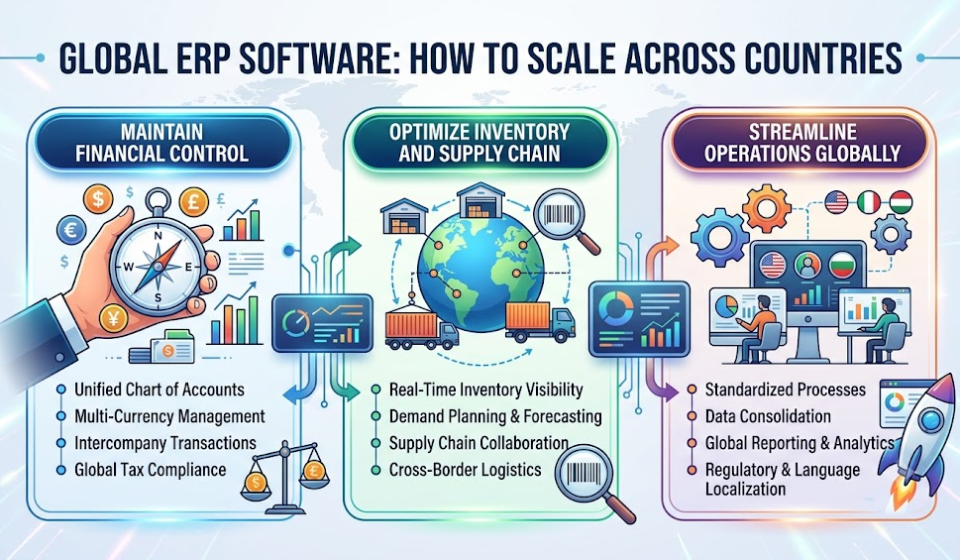
Global ERP Software: How to Scale Across Countries Without Losing Control of Finance, Inventory and Operations

Expanding into a new country creates opportunities for revenue growth, new customers and stronger market presence. However, international expansion also introduces a difficult operational challenge: maintaining control while every country operates under different business conditions. Finance teams manage multiple currencies, warehouses follow different fulfilment processes, local teams handle different tax requirements, and senior management needs a reliable picture of the entire business.
Without the right systems, companies often discover that their international growth has created more reporting work, disconnected inventory records and delayed management decisions. A regional manager may report healthy sales while headquarters struggles to understand actual profitability. Similarly, a warehouse may show sufficient stock locally, yet the business may still face shortages because inventory across other locations remains invisible.
Global ERP Software helps businesses connect finance, inventory, procurement, sales and operational workflows across countries while preserving the flexibility required by local teams. Instead of managing international operations through disconnected applications and spreadsheets, businesses can establish a coordinated operating model with centralized visibility and country-specific processes.
The key is not simply to install ERP software in every country. Rather, companies need a global ERP strategy that balances standardization, local compliance, accurate reporting and operational control.
What Is Global ERP Software?
Global ERP Software is an enterprise resource planning system designed to coordinate business operations across multiple countries, legal entities, currencies and locations. It connects core business functions through a shared data and process framework, allowing headquarters to monitor overall performance while regional teams manage their local activities.
For example, an Indian manufacturing company expanding into the UAE and Singapore may need to manage purchasing in different currencies, maintain country-specific customer records, coordinate international shipments and compare profitability across its operations. A suitable global ERP system connects these activities so that management can review both individual entities and the consolidated business.
Unlike a basic accounting application, global ERP software must support more than financial transactions. It should connect order processing, inventory, procurement, production where applicable, customer management, reporting and approval workflows. Most importantly, the system should distinguish between what must remain consistent across the organization and what must adapt to local business requirements.
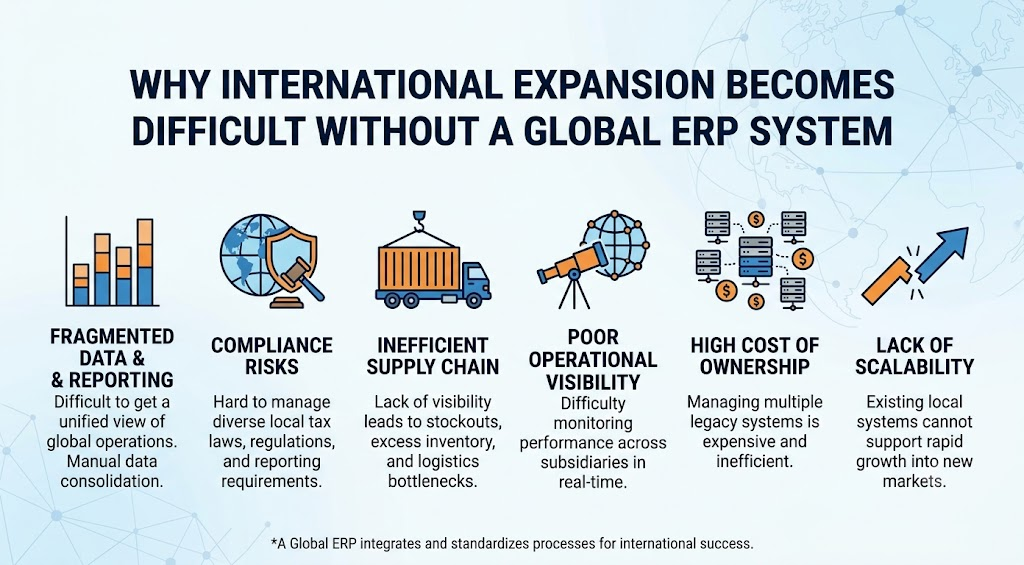
Why International Expansion Becomes Difficult Without a Global ERP System
Disconnected financial data delays business decisions
When each country uses a separate accounting system, finance teams must collect reports, reconcile transactions and map different account structures before preparing consolidated financial statements. Consequently, leadership may receive financial information too late to respond to rising costs or declining margins.
Currency differences add another layer of complexity. Revenue recorded in one currency cannot be compared directly with expenses recorded in another without applying an appropriate currency conversion method. Furthermore, exchange-rate movements can affect reported results even when local operations have not changed.
A global ERP system can standardize financial reporting structures, maintain transaction and reporting currencies, support configured exchange-rate processes and organize financial information by legal entity. It can also support intercompany accounting and consolidation workflows, depending on the system’s capabilities and configuration.
For example, a company operating in India and the UAE could review local financial performance alongside group-level reporting. Finance leaders would have a clearer basis for comparing revenue, expenses, receivables and profitability across entities. However, consolidation rules, exchange-rate treatment and statutory reporting requirements must be configured according to the company’s accounting policies and applicable regulations. Software alone does not guarantee accurate financial reporting.
Inventory shortages continue even when stock exists elsewhere
International businesses frequently hold inventory across multiple warehouses, distribution centres and regional offices. Unfortunately, when these locations operate independently, purchasing teams may order additional stock without knowing that another warehouse already holds available quantities.
The result is avoidable procurement expenditure, excess inventory, delayed deliveries and increased working-capital pressure.
Global inventory management through ERP connects stock records with purchasing, sales orders, warehouse movements and replenishment workflows. When configured correctly, it helps teams understand stock availability by location, identify committed quantities and evaluate whether inventory can be transferred between warehouses.
Consider a distributor with operations in India and the UAE. If the UAE warehouse faces a shortage while another approved location has excess stock, connected inventory records can help the procurement team evaluate a transfer before placing another supplier order.
Nevertheless, visibility must be supported by accurate transactions. Delayed goods-receipt entries, unrecorded warehouse movements and incorrect item masters can still create discrepancies. Therefore, companies should combine ERP implementation with stock reconciliation, barcode or scanning processes where appropriate, and clear inventory ownership.
Local teams follow different processes, creating inconsistent operations
Regional teams often develop their own spreadsheets, approval methods and reporting formats because the central system does not accommodate their requirements. Over time, these workarounds create inconsistent processes and make performance comparisons difficult.
A global ERP implementation should establish common processes for essential activities such as purchase approvals, customer master data, financial controls and management reporting. At the same time, local teams may require different tax treatments, invoice formats, languages, payment practices and approval thresholds.
The practical solution is controlled flexibility. Headquarters defines the standards that protect business consistency, while country-level configurations accommodate legitimate local requirements. This approach reduces unnecessary duplication without forcing every location to operate identically.
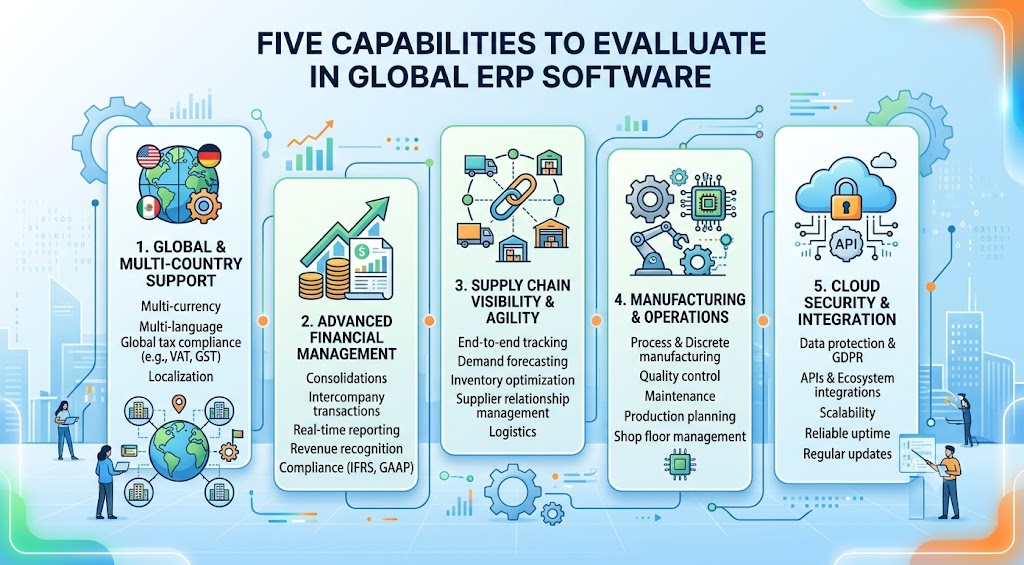
Five Capabilities to Evaluate in Global ERP Software
1. Multi-currency accounting and consolidated financial reporting
A global ERP system should distinguish transaction currency, entity-level accounting requirements and group reporting currency. It should also support appropriate exchange-rate maintenance, reconciliation, intercompany transactions and consolidation workflows.
For decision-makers, the benefit extends beyond producing a single group report. They need to compare country-level margins, identify overdue receivables, monitor cash requirements and understand the factors affecting profitability. Before selecting a system, finance leaders should verify how it handles foreign currency revaluation, exchange differences, intercompany eliminations, different financial calendars and local account structures. These requirements vary according to organizational complexity and reporting standards.
2. Multi-country tax and regulatory localization
Different countries may require different tax registrations, statutory reports, invoice formats and electronic invoicing processes. These requirements can also change over time. Consequently, businesses should evaluate the ERP system’s actual localization coverage rather than relying on broad claims that it supports global operations. Microsoft’s documentation, for example, describes country-specific localization and configurable globalization capabilities for supported jurisdictions. However, the exact functionality and compliance coverage depend on the product, country and configuration. Microsoft Learn: Globalization Studio.
For an organization operating in India and the UAE, the implementation team should validate the relevant tax rules, invoice requirements, reporting formats and integrations for each entity. Local accounting professionals should also review whether the configured system meets applicable legal obligations.
3. Real-time inventory visibility across warehouses
Inventory visibility should extend beyond a basic stock balance. Managers need to distinguish available stock from reserved quantities, stock in transit, damaged inventory and goods awaiting inspection. A capable global ERP system should connect warehouse transactions with sales orders, purchase orders and replenishment planning. It should also provide reports that help managers identify slow-moving inventory, stockouts and discrepancies between physical and recorded quantities.
For manufacturers, the same principle should extend to raw materials, work in progress and finished goods where supported. Connecting inventory to production schedules and material requirements helps teams understand how a shortage in one location could affect orders elsewhere. The result is better-informed purchasing, fewer avoidable stock transfers and improved delivery planning.
4. Centralized workflows with local approval controls
As businesses expand, management cannot personally approve every transaction in every country. At the same time, removing approval controls can increase financial and operational risk.
A global ERP system should support configurable workflows based on factors such as transaction value, department, entity, cost centre and responsible manager. For example, a regional purchasing manager may approve routine purchases within an agreed limit, while higher-value commitments require authorization from headquarters.
Workflow automation can also notify the appropriate person when an approval is delayed or a transaction requires attention. This helps reduce dependence on email follow-ups and undocumented decisions. The important consideration is auditability. Organizations should establish role-based access, approval histories, segregation of duties and clear escalation rules. Centralized control should make decisions more transparent, not create unnecessary bottlenecks for regional teams.
5. Cross-country dashboards and management reporting
A collection of country reports does not automatically provide useful global business intelligence. Leadership needs consistent definitions, reliable data and the ability to investigate the reasons behind performance changes. A global ERP dashboard should help decision-makers compare sales, operating expenses, gross margins, receivables, inventory turnover and order fulfilment across entities. Furthermore, authorized users should be able to drill down from a group-level metric into the underlying regional or transactional information.
For instance, if one country reports declining margins, management should be able to investigate whether the change relates to purchasing costs, foreign exchange movements, freight expenses, pricing or inventory losses. This is where integrated ERP data and business intelligence become valuable. Instead of waiting for separate teams to prepare spreadsheets, managers can use consistent reporting structures to investigate issues and coordinate corrective action.
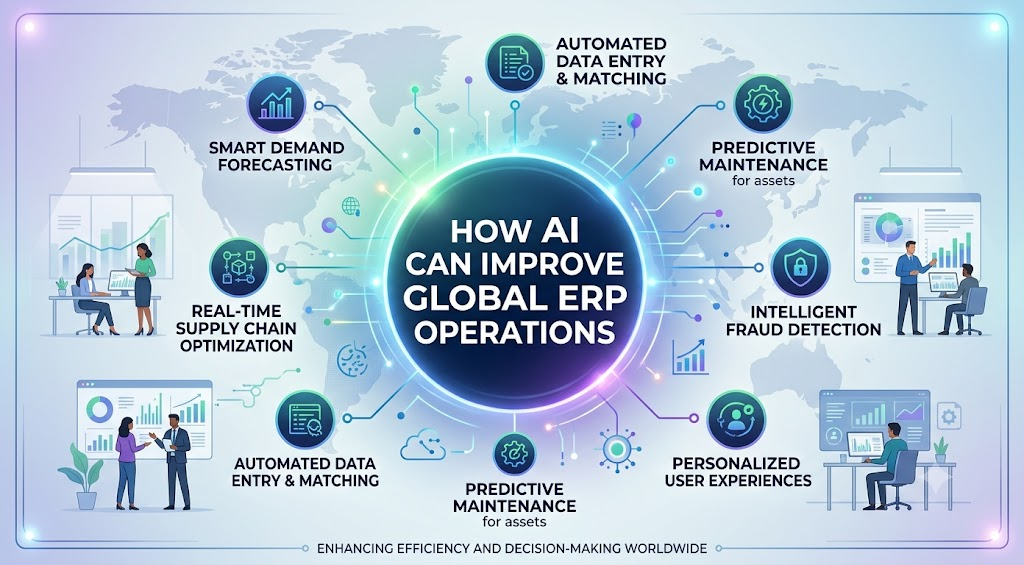
How AI Can Improve Global ERP Operations
AI can extend the value of global ERP software by helping teams identify patterns, prioritize exceptions and make better-informed decisions. However, useful AI depends on accurate data, appropriate controls and a clear business objective.
For example, forecasting models can analyze historical sales, seasonality and other relevant demand signals to help estimate inventory requirements across regions. Anomaly detection can flag unusual transactions or unexpected changes in expenses for further review. Intelligent workflow assistance can also help users identify overdue approvals, missing information or recurring operational delays.
For international distributors, combining demand forecasts with warehouse stock, supplier lead times and open sales orders may improve replenishment decisions. Similarly, finance teams may use analytical tools to identify unusual payment patterns or investigate unexpected movements in working capital.
Nevertheless, AI forecasts are not guarantees. Poor-quality master data, sudden market changes and unreliable historical records can reduce accuracy. Therefore, businesses should validate recommendations, define approval boundaries and measure model performance before automating high-impact decisions.
AI readiness should be evaluated as part of the ERP selection process. Buyers should ask whether the system supports reliable integrations, governed data access, usable reporting and appropriate controls over AI-assisted decisions.
How to Implement Global ERP Software Without Disrupting Existing Operations
Start with a global operating model
Before selecting software, identify the countries, legal entities, warehouses, currencies and business functions that must be connected. Document which processes should be standardized and which require local variations. This step is essential because an unclear operating model can turn an ERP project into a collection of disconnected country implementations. Finance, operations, IT and regional management should agree on the target processes, reporting structure and responsibilities before configuration begins.
Establish common master data and reporting definitions
Customer records, supplier information, product codes, units of measure and account mappings must remain consistent enough to support reliable cross-country reporting.
For example, if two entities classify the same expense differently, their financial results may be difficult to compare. Similarly, duplicate supplier records can complicate procurement analysis and payment controls.
A structured data-cleansing and governance process helps prevent these problems before migration. Businesses should also define who owns master data, who approves changes and how data quality will be monitored after go-live.
Roll out in controlled phases
Rather than changing every country and business function simultaneously, organizations can begin with a representative entity or a clearly defined operational scope. This provides an opportunity to test financial reporting, inventory movements, integrations, user access and approval workflows before expanding.
After the initial rollout, the implementation team can resolve issues, refine training and apply proven configurations to additional locations. However, each country’s regulatory and operational requirements must still be validated individually.
Finally, establish measurable success criteria. Reporting preparation time, inventory accuracy, order fulfilment performance, overdue approvals and reconciliation effort can help management evaluate whether the implementation is delivering the intended results.
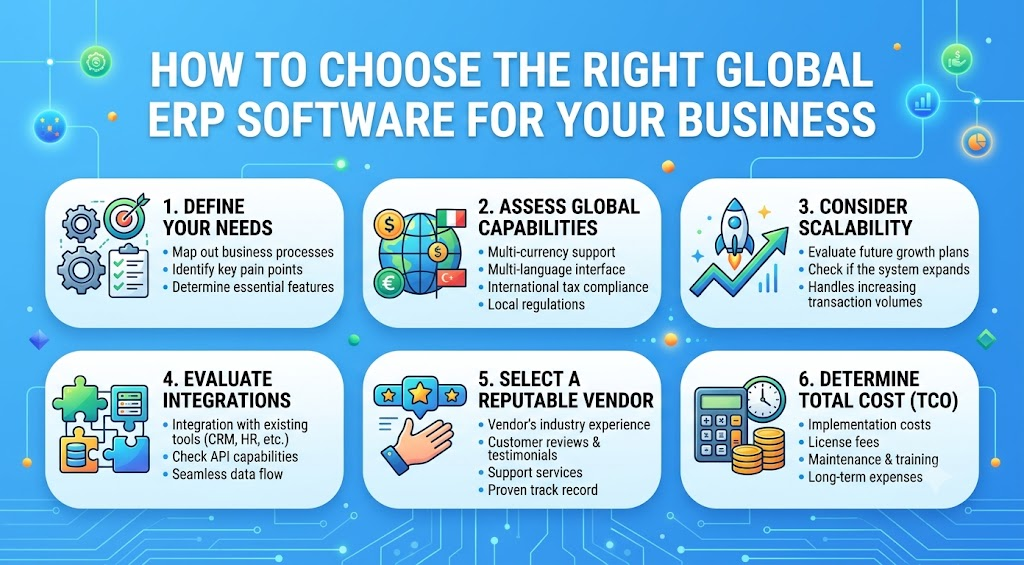
How to Choose the Right Global ERP Software for Your Business
The best global ERP software is not necessarily the system with the longest feature list. It is the system that fits your operating model, supports your required countries and can grow with your business without creating unnecessary complexity.
Before making a decision, assess the number of legal entities, the volume of intercompany transactions, reporting requirements, warehouse complexity, integration needs and expected expansion plans. Also examine implementation effort, customization flexibility, security, support arrangements and the total cost of ownership.
Request a demonstration based on your actual business scenario. Ask the vendor to show how a transaction moves from a local purchase order to goods receipt, supplier invoice, accounting entry and consolidated reporting. Then test a cross-warehouse stock movement, a regional approval workflow and a country-specific reporting requirement.
This approach exposes practical limitations that a standard product presentation may overlook. It also helps stakeholders compare systems based on business outcomes rather than feature descriptions alone.
For growing businesses, an adaptable ERP platform can be particularly valuable when workflows change as new branches, product lines or markets are introduced. However, flexibility should be balanced with governance, maintainability and documented controls.
Frequently Asked Questions About Global ERP Software
What is the difference between global ERP and multi-company ERP?
Multi-company ERP focuses on managing multiple companies or legal entities within a connected system. Global ERP extends this requirement to international operations, where multiple currencies, local regulations, languages, warehouses and reporting practices may also need to be supported. The precise distinction depends on the software vendor and the organization’s requirements.
Can global ERP software manage different currencies and country-specific taxes?
Yes, suitable systems can support multiple currencies and configured country-specific tax and reporting processes. However, buyers must verify support for their actual jurisdictions, legal entities and statutory requirements. Additional localization, integrations or configuration may be necessary.
Is global ERP software suitable for small and medium-sized businesses?
Yes. SMEs expanding internationally can benefit from integrated financial reporting, inventory visibility and standardized workflows. The right solution should match the organization’s current complexity while allowing it to add entities, users and processes as the business grows.
How does global ERP software improve inventory control?
It connects inventory records across warehouses and business entities, helping authorized teams review stock availability, reservations, movements and replenishment requirements. Accurate transaction processing and consistent inventory procedures remain essential to achieving reliable visibility.
How long does global ERP implementation take?
There is no universal implementation timeline. The duration depends on the number of countries and entities, data quality, regulatory requirements, integrations, customization and organizational readiness. A clearly scoped phased rollout can help control risk, but the project plan should be based on a detailed requirements assessment.
Scale Internationally With Better Control Over Every Business Operation
International expansion should create new opportunities, not force your teams to spend more time reconciling spreadsheets, chasing approvals and searching for reliable business information.
With the right Global ERP Software, businesses can connect finance, inventory, procurement, reporting and operational workflows while giving regional teams the flexibility to meet their local requirements. More importantly, leadership gains a stronger foundation for understanding performance, controlling risk and making expansion decisions with greater confidence.
Bluechip Solutions helps businesses evaluate ERP-driven approaches to connected operations, process automation and business visibility. If your organization is planning to enter new markets or struggling to coordinate existing international operations, the next step is to identify the gaps between your current systems and your global growth plans.
Ready to scale across countries without losing operational control?
Explore Bluechip Solutions to discuss your ERP requirements and identify an approach suited to your business.
Explore Auvit No-Code ERP to learn more about an adaptable ERP platform for connected business processes.
Request a Free ERP Consultation: Schedule a Call with Bluechip Solutions
Get the Global ERP Readiness Checklist: 15 Questions to Answer Before Expanding Into a New Country. Use it to assess multi-currency accounting, tax localization, inventory visibility, intercompany reporting, workflow controls, data governance and integration readiness before selecting your next ERP system.